



 You have successfully registered


FINANCIAL ACCOUNTING & CONTROLLING
UNIT1: INTRODUCTION TO SAP S/4 HANA
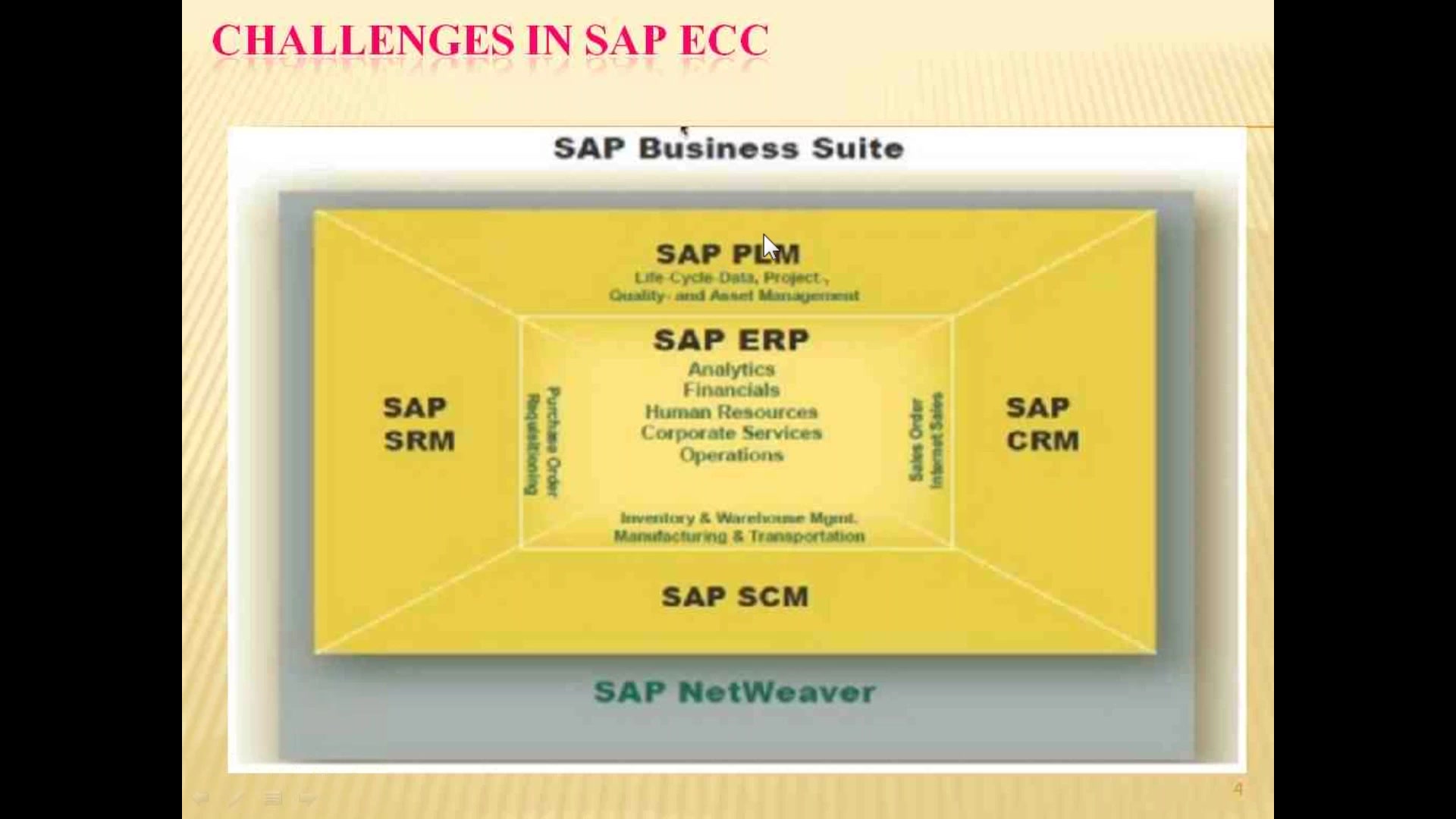
Challenges in ECC and need for HANA DATABASE.
Advantages of SAP HANA DATABASE.
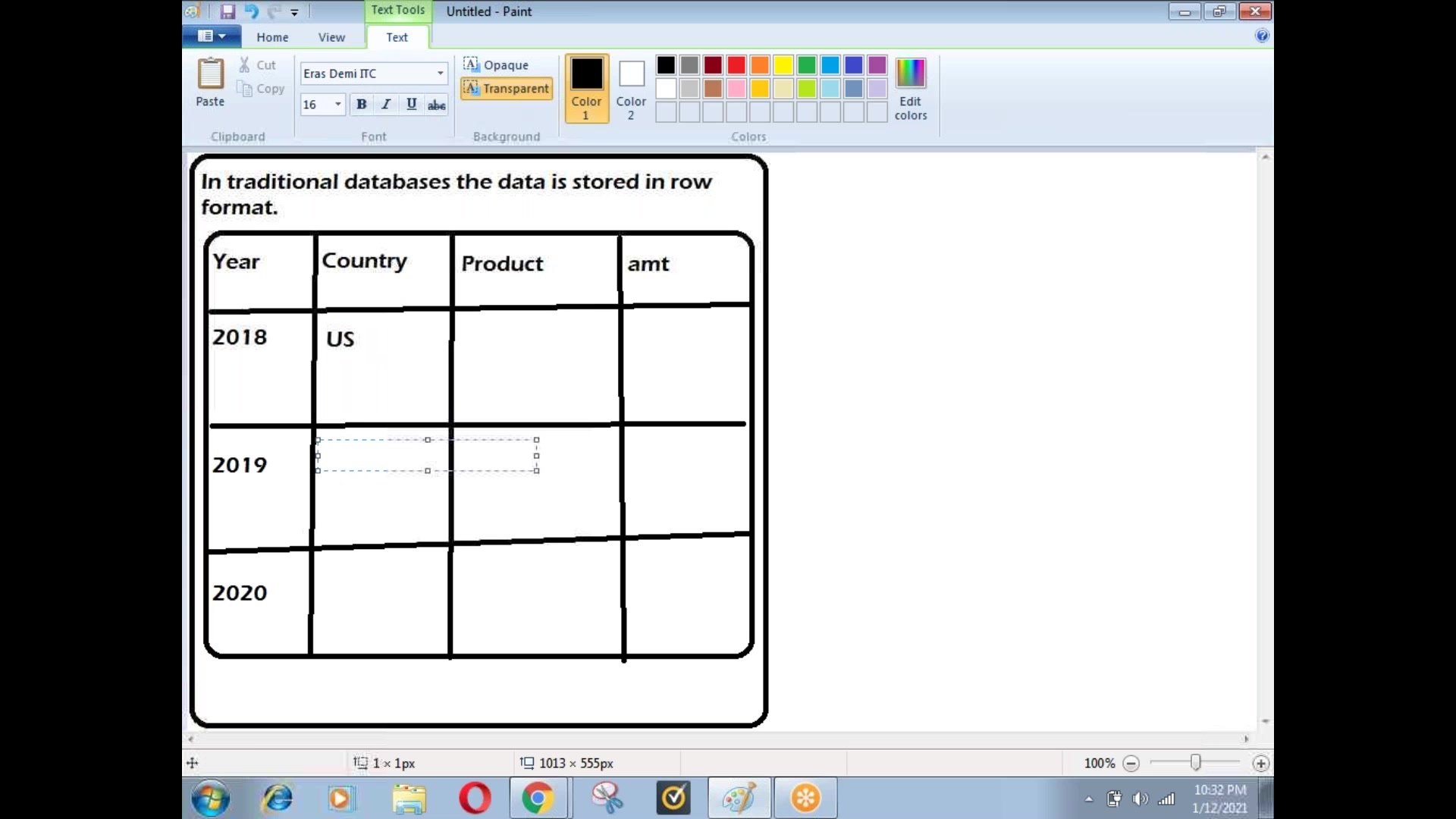
What is IMDB, MPP, Difference between Row and Column based storage.
Technology behind S/4 HANA (TREX, P*TIME & MAX DB)
Deployment options in SAP HANA.
Introduction to cloud options, Services available in the cloud.
Types of Projects in S4 HANA – Green field Project, Brown field Project and System landscape transformation Server
UNIVERSAL JOURNAL SETTINGS
UNIT 2:FI ENTERPRISE STRUCTURE
Organization Structure
Define Company
Define Company Code
Maintain Business Area
Assign company code to company.
UNIT 3: BASIC SETTINGS IN FI
Define fiscal year variant
Assign of fiscal year variant to company code
Define posting period variant
Assign of posting period variant to company code
Open and close posting period
Maintain field status variant
Assign of field status variant to company code
Create chart of Accounts
Define Accounts Group
Define Retained Earnings Account
Define of tolerance groups for GL accounts
Define of tolerance groups for employees
Document types and number ranges.
UNIT 4: BASIC SETTINGS OF CO
Define Controlling Area
Define Number ranges for Controlling Area
Maintain Planning Versions, Define ledger for CO Version
UNIT 5: PROFIT CENTER ACCOUNTING
Basic Settings for Profit Center Accounting
Creation of Dummy Profit Centers
UNIT 6: NEW GENERAL LEDGER ACCOUNTING
Ledger based approach vs account-based approach
Create of non-leading ledgers
Assign non leading ledgers to company code
Define and assign accounting principles to ledgers
UNIT 7: END USER ACTIVITIES
Create G/L ACCOUNTS- Change, Block and delete G/L Accounts
Create with template
Post Accounting Transaction (General posting)
Common errors and rectification in GL Posting
Display documents
Display G/L Balances
Holding of documents, Parking of documents, Parking of incomplete document
Reference documents
Sample documents, Recurring documents and account assignment model
Reversals
Individual reversal, Referral of reversed document, Mass reversal
LEDGER SPECIFIC POSTING
Tables for transaction data
Display universal Journal table
Document header data table, Document line-item table etc.
UNIT 8: NEW FUNCTIONALITIES IN S4 HANA
Ledgers in S/4 Finance–Standard ledger and extension ledgers
Need for extension ledgers
Posting to the extension ledger
Posting in foreign Currency
Currency types and currency codes
Assign currency types to company codes and ledgers
Posting in foreign currency
INTEREST CALCULATION
Interest on bank loan – Credit interest balance interest
Interest on fixed deposits- Debit interest balance interest
UNIT 9: INTRODUCTION TO ACCOUNTS PAYABLE AND ACCOUNTS RECEIVABLES
CHANGES IN ACCOUNTS PAYABLE AND ACCOUNTS RECEIVABLES
Accounts Payables
Business Partners in S/4 HANA (Vendors).
Need for business partners
Scenario 1 – Vendor and business partners with identical groups and numbers
Vendor account groups and business partner grouping.
Vendor numbering and business partner numbering.
Customer vendor integration (CVI)
Creation of G/L Accounts for accounts payables
Creation of Business partners
Vendor invoice, Vendor credit memos and Vendor payment.
Display Vendor balances.
Common errors and rectification in Accounts payables
Correspondence and account statement
Advance payment to vendor
Advance clearing.
Convert the excess payment as advance and adjust that amount against the next invoice.
Vendor payment terms
Maintain terms of payment for vendors
Invoice posting and payment to vendor with payment terms.
Cash discount without payment terms
Other scenarios related to payment terms
Bank charges and Payment difference
Installment payment to Vendor
Tables in A/P
Vendor general data table, Company code data table, Business partner general data table, BP Roles table, Table for vendor BP Link
Scenario 2 – Vendor and business partners with Different groups and different number ranges
ACCOUNTS RECEIVABLES
Business Partners in S/4 HANA (Customers).
Scenario 1 – Customer and business partners with identical groups and numbers
Customer account groups and business partner grouping.
customer numbering and business partner numbering.
Customer vendor integration (CVI)
Creation of G/L Accounts for accounts receivables
Creation of Business partners
Customer invoice, Customer credit memos and Customer payment.
Display customer balances.
Correspondence and account statement
Advance payment from customer
Advance clearing.
Customer payment terms
Maintain terms of payment for customers
Invoice posting and payment from customer with payment terms.
DUNNING
Creation of dunning procedure
Generation of dunning letters
Errors in dunning
Bills of exchange
Link Between Reconciliation Account and Special G.L Account
Define Account for Bills Exchange Transactions
Bills of Exchange payment Receipt
Bank Bill Discounting
Reverse Contingent Liability
Scenario 2 – Customer and business partners with different groups and different number ranges
VENDOR AND CUSTOMER BEING SAME WITH COMMON TERMS OF PAYMENT.
Tables in A/R
Customer general data table, Company code data table, Business partner general data table, BP Roles table, Table for Customer BP Link
UNIT 10: CHECK MANAGEMENT
Manual check management
Creation of house banks, Changes in the house bank in S4 HANA.
Creation of check lots and void reason codes.
Creation of Manual checks,
Cancellation of checks – Unused checks, issued checks, Stop payment
display check register,
Check encashment.
Automatic Payment Program (APP)
Configuration settings for APP, Payment run, Different scenarios in APP
Bank reconciliation statement
UNIT 11: CASH JOURNAL
Creation of Cash account
Define Number Range Intervals for Cash Journal Documents
Setup Cash Journal
Maintain Cash Journal Transaction Names
Print parameters for cash journal
Cash Journal Posting
UNIT 12: FOREIGN CURRENCY VALUATION (FCV)
Difference between Unrealized and realized forex gains and losses
Creation of Valuation methods, Valuation procedures for FCV,
Valuation areas, accounting principles.
Creation and assignment of G/L Accounts for FCV
Posting in foreign currency.
Execute FCV for calculation of Unrealized and realized forex gains and losses.
FCV with simulation ledger.
UNIT 13: NEW ASSET ACCOUNTING
Classic Asset accounting VS New asset accounting.
Depreciation areas for local GAAP and IFRS.
What is Delta depreciation? Why it is not needed in new asset accounting?
Copy reference chart of depreciation.
Specify transfer rules for APC
Assignment of chart of depreciation to company code
Specify account determination
Definition of screen lay out rules
Definition of number ranges for asset master
Creation of asset classes
Integration with General Ledger
Creation of depreciation key
Why different screen layout is needed in asset accounting?
Posting in multiple depreciation areas without delta depreciation.
Need for technical clearing account in new asset accounting.
Integrated asset acquisition,
operational vs valuation specific posting.
Asset retirement with and without customer,
Asset transfer, Asset scrapping etc
UNIT 14: COST CENTER ACCOUNTNG
Defining Cost Center Standard Hierarchy
Creation of Cost Centers and cost center groups
Display cost center master records
Change cost center master records
Posting to cost centers
Display Co documents.
Planning cost center wise
Plan/Actual comparison reports
Reposting of co line items
Repost of Costs
Cost center reports
UNIT 15: INTERNAL ORDERS
Define field status group for statistical orders
Creation of primary cost element for internal orders
Creation of Order type
Creation of internal order master records for statistical orders
Display internal order master records
Change internal order master records
Postings to internal orders
Planning for internal orders
Variance analysis for internal orders
Real orders
Field status group for real orders
Creation of primary cost element for real orders
Creation of secondary cost element.
Define of allocation structures
Define of settlement profiles
Define number ranges for Settlement documents
Number ranges for CO Documents.
Creation of order types and order groups
Posting of business transaction to real orders
Cost settlement using settlement process
CAPITAL WORK IN PROGRESS LINE-ITEM SETTLEMENT
Define and assign settlement profile for asset accounting
Activate 0%depreciation key
Creation of CWIP asset master
Posting of freight charges to CWIP
Settlement of CWIP to Plant and machinery
UNIT 16: PROFIT CENTER ACCOUNTING
Basic Settings for Profit Center Accounting
Creation of Dummy Profit Centers
Maintenance of control parameters for actual postings
Maintaining planning versions for profit centers
Maintaining the number ranges for profit center documents
Creation of profit center master records
Display of profit center master records
Changing the profit center master records
Assign profit center to cost center for expenditure posting
Creation of revenue cost elements
Automatic Assignment of Revenue elements for Profit Centers
Creation of account groups in profit center accounting for planning
Posting of transactions into profit centers
Generating the reports for profit and loss account items
UNIT 17: INTEGRATION OF FI WITH MM
MM Consultants activities
Creation of Enterprise structure from MM Side
Configuration settings from MM Side for purchase to Pay cycle (P2P Cycle)
FI Consultants activities
Creation of G/L Accounts
Assignment of accounts for automatic posting
CO Consultants activities
Creation of Material Ledger
Assign and activate the material ledger.
MM End user activities
Creation of Purchase order
Post goods Receipt from MM – check the FI side entry
Post invoice Receipt from MM – check the FI side entry
Raw material consumption from MM – check the FI Side entry.
Display stock ledger.
UNIT 18: INTEGRATION OF FI WITH SD
SD Consultants activities
Creation of enterprise structure from SD Side
Configuration settings from the SD Side for Order to Cash cycle (O2C Cycle).
FI Consultants activities
Creation of G/L Accounts
Assignment of accounts for automatic posting
SD End user activities
Creation of sales order from SD
Production receipt from MM
Outbound deliver from SD—Check the FI Side entry
Billing document from SD – Check the FI Side entry
Customer payment
Display stock ledger
PART 19: ANALYZING THE OPTION OF CENTRAL FINANCE
Transition to SAP S/4 HANA Greenfield implementation and Brownfield implementation.
Option of central finance.
Introduction to SAP SLT.
Layers in Central Finance.
Need for Master Data Governance.
central finance accounting interface and application link framework.
What is initial load
central payments
PART 20: SAP ACTIVATE METHODOLOGY & SYSTEM CONVERSION FROM ECC TO SAP S/4 HANA
Introduction to SAP Activate methodology
Types of implementations in SAP S/4 HANA
Scenarios of migration.
Migration tools like maintenance planner, custom code analyzer, SUM (Software update manager).
Phases of activate methodology
PART 21: DOCUMENT SPLITTING
Introduction to document splitting
Types of document splitting – Active splitting, Passive splitting, Zero balancing splitting
Classify GL Accounts for Document Splitting
Classify Document Types for Document Splitting
Define Zero Balance Clearing Account
Define Document Splitting Characteristics for General Ledger Accounting
Activate Document Splitting
Post transaction and cross verify the splitting process
RESUME PREPARATION
INTERVIEW QUESTIONS DISCUSSION




 Certified



