



 You have successfully registered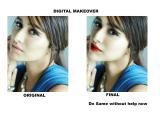

Course Overview
This course is designed for photographers, graphic designers, content creators, and digital artists who want to elevate their retouching skills to a professional level — harnessing both Photoshop's classic toolkit and the cutting-edge AI-powered features that are reshaping the industry.
You will move from foundational concepts all the way to advanced composite workflows, learning how to retouch skin non-destructively, remove distractions intelligently, replace backgrounds in seconds, and produce images that meet commercial, fashion, and editorial standards.
| Who Is This Course For? Beginner-to-intermediate Photoshop users ready to go professional · Photographers who want to handle their own post-production · Designers and content creators working with brand imagery · Freelancers looking to offer high-end retouching services |
Prerequisites
- Basic familiarity with Photoshop's interface (layers, basic tools)
- A computer running Photoshop 2023 or later (Creative Cloud subscription recommended)
- No prior AI tool experience required — everything is taught from scratch
Learning Outcomes
By the end of this course, you will be able to:
- Perform studio-grade skin retouching using frequency separation and dodge & burn
- Leverage Photoshop's AI tools: Generative Fill, Neural Filters, Remove Tool, Sky Replacement
- Build efficient, non-destructive editing workflows with Smart Objects and adjustment layers
- Retouch hair, clothing, and product shots to commercial standards
- Create seamless composites using AI-assisted masking and blending
- Deliver final files in correct formats for print, web, and social media
- Build a professional retouching portfolio



 View this Course
 Top Tutor



 Teacher's Knowledge
 Certified



