3,764
3,764 Do you need help in finding the best teacher matching your requirements?
Post your requirement nowComputer Science Lessons

Ask a Question
Post a LessonAnswered on 18/01/2024 Learn Exam Coaching/Foreign Education Exam Coaching/Advanced Placement Tests Coaching/Computer Science

Chandrabhan Vithal Zarekar
Yoga tutor at home teaching since 20years
Answered on 06/10/2024 Learn Exam Coaching/Foreign Education Exam Coaching/Advanced Placement Tests Coaching/Computer Science

Tanmoy Gupta
20+ years experienced SCM Consultant | Corporate Trainer | Python, Java, DSA & Analytics Mentor |
Hi Anya, your code is full of syntactical errors. Rectified cde is as follows:
#include <iostream>
using namespace std;
int main() {
int a[4]; // Array of size 4
int *p; // Pointer to integer
p = a; // Assign the address of the first element of array 'a' to pointer 'p'
*p = 10; // Set the value at the memory location pointed to by 'p' (i.e., a[0]) to 10
p++; // Move pointer to the next element in the array
*p = 20; // Set the value at the memory location pointed to by 'p' (i.e., a[1]) to 20
p = &a[2]; // Set pointer 'p' to point to the third element of the array 'a'
*p = 30; // Set the value at the memory location pointed to by 'p' (i.e., a[2]) to 30
// Loop to print the first three elements of the array
for (int i = 0; i < 3; i++) {
cout << a[i] << " , "; // Print the array values followed by commas
}
return 0;
}
Output:
10 , 20 , 30 ,
read lessAnswered on 14/06/2021 Learn Exam Coaching/Foreign Education Exam Coaching/Advanced Placement Tests Coaching/Computer Science

Rahul
Certified for Assistant Professor with 10 months of experience in IT Industry.
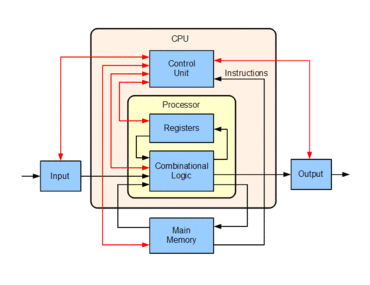
The processor also called a central processing unit (CPU).
There are mainly three components of CPU :
The main work of the processor is to process the instruction given to it and produce the final result as output.
All CPUs have an instruction set containing the list of actions that the processor performs, such as adding two numbers, and on these instructions, ALU performs calculations and comparisons. Control unit coordinates among processors other components; the control unit does all the fetching work from memory. E.g. the control unit could direct ALU to perform an addition operation and multiply it with the third number. However, CPUs have a limited amount of high-speed memory called REGISTERS upon which ALU acts directly rather than having a control unit to fetch instructions from the main memory.
read lessAnswered on 27/01/2020 Learn Exam Coaching/Foreign Education Exam Coaching/Advanced Placement Tests Coaching/Computer Science

Naval Gupta
Success Coach and Mentor
Akhile,
Coding and PowerBI are two different skills. Both have different outcomes. No need to learn coding to learn PowerBI.
Think of you long term goals and if you think that learning PowerBi fits into those, then go for it. Becoming an expert is going to be valuable in the long run.
Answered on 11/03/2020 Learn Exam Coaching/Foreign Education Exam Coaching/Advanced Placement Tests Coaching/Computer Science

Charlie
AutoCorrect is a Microsoft tool that helps us detect and correct typos, wrong spellings and case sensitive words in Microsoft Word. You can customise it according to your needs when you're exporting or importing from or to another computer.
There are two ways by which you can export or import AutoCorrect from one computer to another: One is manually, and the other is by using Kutools for Word. For manually importing and exporting the files, you have to follow the steps:
- copy the Normal. dotm file on your computer to a destination the network can access.
- C:\Documents and Settings\username\Application Data\Microsoft\Templates locate his file on your destination computer, on which you want the data to be stored. To have a backup of the file, rename it to Normal.bak
- Close all the Microsoft applications and copy the Normal. dotm file and paste it in C:\Documents and Settings\username\Application Data\Microsoft\Templates on the destination computer.
The procedure is much simpler using the Kutools tool:
- Click Enterprise > Import / Export > AutoCorrect to export the AutoCorrect entries
- Select whatever you want to export and export it to files of the intermediate location, which is accessed by the destination computer.
- Then your AutoCorrect files will be exported to a specific folder.
read less
Ask a Question
 3,764
3,764 






 Verified








 0
0