Access to quality education has longer been restricted to popular institutions and training centres. With a tremendous growth in technological trends in the past several years, Online Education has emerged with the goal to provide quality education at a global scale, without any geographical and time related constraints.
 Online education stands to have an extreme impact on modernization, employment, communication and culture all around the world. Learning opportunities have now become more abundant, inexpensive and more accessible. A number of trainers are now providing their training classes over the internet and the number of students enrolling for online classes is increasing tremendously.
Recording an Online Course
An online training session, unlike traditional classroom training session, needs to be either delivered as a live online session or as a recorded training session. Here are three primary ways how tutors/trainers can record their sessions and them upload them online:
-
Recording as Narrated PowerPoint Presentation
PowerPoint Presentations are the most preferred and the most efficient way to deliver an online course. This is because PowerPoint is equipped with all the necessary tools through which it can facilitate audio and video recording along with displaying the presentation slides. PowerPoint can record audio while a session is in a slideshow, and can then save it in the presentation. Trainers can then provide through online courses. In order to record and listen to a narrated presentation, your system must have a sound card, microphones, and speakers.
Using Microsoft PowerPoint, follow these steps to record your voice with the presentation slides:
1. Take the cursor to the “Slide Show Tab” at the top of the screen.
2. Click on the “Record Slide Show” button below this tab.

3. You will be provided with the option to either start recording from the current slide or record from the beginning of the presentation.
4. Click on “Start Recording” whenever you are ready.
6. You can press the Escape (ESC) button to stop recording.
Note: Make sure you save your PowerPoint presentation. Ensure your microphone is set up and in working order prior to recording your slide show.
-
Recording as Narrated Screen Captures
Capturing your desktop screen is another way to record a training session. We can generally take screenshots of the desktop by pressing the “Prnt Scr” button on the keypad but this won’t work.
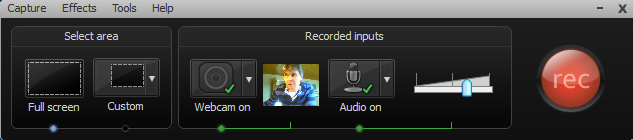
There are a number of software tools which can be used to create video tutorials directly through screen capturing. Camtasia and Screenflow are two popular screen capturing tools. An example of recording in Camtasia is shown below:
Camtasia Recording
- Select an area to record i.e. either the Full screen or the Custom dimensions.
- Select the recording settings: whether you want to use the webcam, whether you want to record the audio etc.
- Click the Record button.
You can save the recording as a video file and can also edit it whenever required.
-
Recording as a Narrated Video Clip
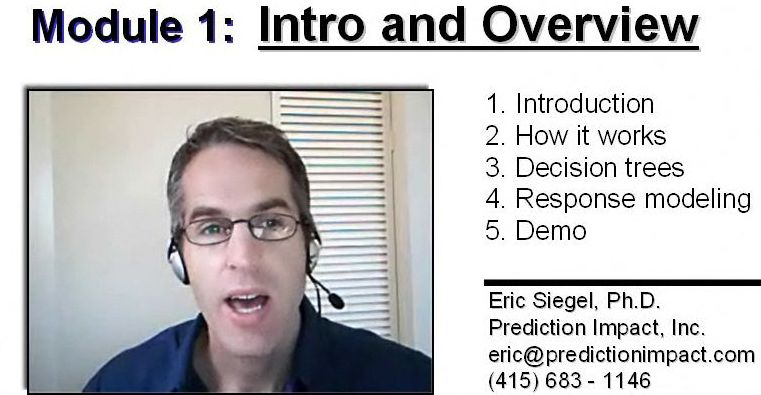
You may want to include some additional information in the course, other than simply the desktop screen and slideshows. An example could be that you may want to include a visual of your speech in a training session so as to instill a better understanding for the student(s).
source:predictiveanalyticsworld.com
While recording a video, take care of the following:
Video: Prefer using a high resolution or HD video recorder. Most of the latest smartphones and digital cameras come with a 720p video recorder. Any high quality camera, either a DSLR, digital camera or even a smartphone’s camera will do the job for you.
Lighting: Make sure that the brightness and lighting in the video is balanced.
Audio: Always use a good quality microphone to ensure that sound is clearly audible to the learner. USB microphones could be a good choice.
Video length: Avoid making prolong videos and rather split your training into small modules in 5-10 min videos (the length varies as per the type of course).
File Types/Format: Make sure every video is kept to a 1 GB size limit and use commonly supported video formats like mp4, mpeg etc.
Interaction: While recording your video, you should speak as if you are talking to someone in real. Always maintain a consistent eye contact with the camera to make sure that you connect well with the learners.
Useful Tip:
You can use Animated GIFs while preparing an online training session. They could be a great option for depicting a sequence of changes, like the changing earth for example.

source:gifs.alphacoders.com
Also, since Animated GIFs are optical illusions our eyes are likely to catch them quickly.
Combine On-Screen Presence with Visual Content
Another effective way to record online courses is by combining your on-screen presence with visual content. Tools such as Prezi Video allow trainers to appear on camera alongside their presentation material, rather than switching between slides and a talking head. This approach helps learners stay focused on both the instructor and the key ideas being discussed, creating a more personal and engaging learning experience.
Prezi Video works well for explaining concepts, walking through frameworks, or introducing course modules, as it allows instructors to visually reinforce their message while maintaining eye contact with the audience. This format is particularly useful for online education, where maintaining attention and connection can be more challenging than in a physical classroom.
To join a course on “How to Teach Online”, refer to this link.